

How to sell photography prints online: from file to first order

To sell photography prints online, choose a tight series of your best images, export print-ready files, order a test print, then list the work in a shop with a price that covers every cost. Print on demand handles the printing: each print is made when a buyer orders it and shipped straight to them. You hold no stock and pay for printing only when a print sells.
Step 1: choose a series, not your whole archive
Buyers shop for a picture that fits a wall and a mood. A shop with 300 unrelated photos makes that hard. A shop with three or four clear series makes it easy.
A series is 8 to 20 images that belong together. They might share a place (one coastline in winter), a subject (old shopfronts), or a treatment (black and white, high key, the same muted palette). Pick the images that would still work as a pair or a set of three on one wall.
Leave out pictures that rely on a backstory. A print has to work for a stranger with no caption.
Step 2: edit and export for print
A file that looks good on Instagram can print badly. Check these points before you upload anything.
| Check | What to do |
|---|---|
| Colour space | Export in sRGB. Printumo processes every file in sRGB and converts other profiles, but converting yourself lets you see the result first. |
| Resolution | Aim for 300 DPI at the print size for paper and 150 DPI for canvas. |
| File type | JPEG, PNG, TIFF or HEIC. WebP is not accepted. |
| Sharpening | Sharpen for print on a copy, lightly. Judge it on the test print, not the screen. |
| Watermark | Remove it. Keep watermarks for web previews only. |
| Signature | Optional. If you add one, keep it at least 1 cm (0.4 in) from every edge. |
Printumo does not adjust brightness, contrast or sharpness. What you upload is what gets printed.
How many pixels you need
The formula is: pixels = size in cm / 2.54 x DPI. A 50x70 cm (19.7x27.6 in) paper print at 300 DPI needs about 5,906 x 8,268 pixels. Canvas is made to inch sizes, so a 90x60 cm (36x24 in) canvas at 150 DPI needs 36 x 150 by 24 x 150, which is 5,400 x 3,600 pixels.
A 24-megapixel camera gives you 6,000 x 4,000 pixels. At 300 DPI that covers about 50.8x33.9 cm (20x13.3 in) on paper. Canvas needs half the DPI, so the same file goes much larger on canvas. Our guide to file size for printing has the full tables.
For older or cropped files that fall short, Printumo's AI upscaler can rebuild the image with up to 4 times the pixels in each direction. It is free on your first 3 products. It cannot fix blur, camera shake or glare, and very small files cannot be rescued.
Mind the shape
Most DSLR and mirrorless cameras shoot in 3:2, and phones usually shoot in 4:3. Printumo's canvas has 3:2 sizes such as 60x40 cm (24x16 in) and 90x60 cm (36x24 in), plus 16:9 and 2:1 shapes for panoramas. On paper, 8x12 in and 24x36 in are 3:2, while the A sizes and most cm sizes are a different shape and need a crop. Inch sizes are printed as a matching A or cm size for buyers in Europe and the UK, and A sizes as inch sizes for buyers in the US. That changes the shape, so pick the size family of the country you sell to most.
You crop once per shape, and that crop covers every size of that shape. A product only offers sizes of one shape.
Step 3: proof with a test print
Screens glow. Paper reflects light. A photo that looks right on a bright monitor often prints darker than expected, especially in the shadows.
Edit with the screen brightness turned down, then order a test print of the images you plan to sell. Printumo does not offer printer profiles for soft proofing, so the test print is your proof.
You can order prints for yourself from your Printumo account. A new account gets 30% off the prints and frames in your first order when you place it within 48 hours of signing up. The discount applies automatically.
Look at the test print by daylight and in the room light where it would hang. Check the shadows, the skin tones and the fine detail.
Step 4: paper or canvas for photographs
Both work, for different images.
Fine art paper. A matte fine art paper, giclée printed. It can be sold unframed, framed in wooden frames with a plexiglass front (14 colours), or with a mat (11 colours). On an unframed print the mat is printed onto the sheet as a border. Fine detail, architecture and quiet black and white work tend to look at home on paper. There is no glossy or photo paper option, so if a picture depends on gloss, check it on the test print.
Canvas. A hand-stretched matte canvas, giclée printed, that arrives ready to hang. Canvas suits large sizes, landscapes and images with soft tones. Pay attention to the edges:
- Mirrored edges (the default) keep the whole photo on the front.
- Stretched edges wrap the photo around the sides, so about 4 cm (1.5 in) of each side moves off the front. Avoid this when a subject sits near the edge.
- Solid colour edges leave the sides plain.
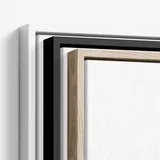
Canvas can also go in a floater frame in Oak, Dark Oak, White or Black.
Step 5: editions and signatures
You have two honest options.
Open edition. The print is available for as long as you sell it. This is the default for print on demand, and it suits most work.
Limited edition. You decide a number, say so in the listing, keep count yourself and stop selling when it is reached. Printumo has no edition numbering, certificates or signing service for prints, so the count is your responsibility. Never put an edition number in the file, because every copy would carry it.
A signature can go into the file itself, at least 1 cm (0.4 in) from every edge. For darkroom prints or other pieces you make and ship yourself, Printumo Shop lets you list originals with a "small edition" quantity.
Our guide to open edition vs limited edition prints covers the pricing side.
Step 6: price from your real costs
Work out what one sale costs you, then add your profit:
Retail price = print cost + shipping you absorb + fees + profit.
Make each size step pay more in absolute terms, and price framed versions so they earn more than unframed ones. Our guide to pricing art prints works through real cost tables and examples.
Sell your art with Printumo
Get started with selling your art as canvas and fine art prints
Step 7: choose where to sell
Sell from your own shop, a website you already run or a marketplace, or several at once.
| Where | Good for | Keep in mind |
|---|---|---|
| Printumo Shop | A free shop of your own with checkout built in | 0% commission; card fees apply. Your own domain and discount codes need Printumo+ |
| Squarespace | Photographers whose portfolio already runs on it | Connect it and sell from the site visitors already know |
| Shopify | A full online store you want to grow | Shopify charges its own monthly plan |
| Wix or WooCommerce | An existing site on either platform | Connect it like the others |
| Etsy | Buyers who are already searching | Listing and transaction fees; many competing shops |
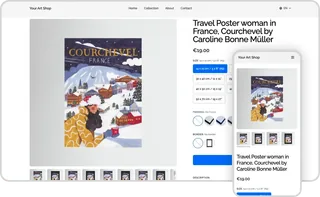
Printumo Shop is a hosted shop at printumo.com/shop/your-name with no monthly fee and 0% commission. Printumo bills only printing and shipping. Buyers pay by card at checkout, and the money is paid out to your own Stripe account. You can also sell originals beside your prints. See how Printumo Shop works.
Your own site. If your portfolio already runs on Squarespace, connect it and add prints without moving anywhere. Shopify, Wix, WooCommerce and Etsy connect the same way: see the integrations page.
Whichever you choose, the order reaches Printumo, the print is made and shipped to your buyer, and the tracking number is sent back to the order in your store. Orders ship in neutral packaging with no Printumo branding.
Step 8: show the print, not just the photo
A buyer needs to see the photo as an object on a wall, at its real size. Printumo makes mockups of every product automatically, in the real frame, mat and size, and uses them as listing photos in your connected store. Show at least one room picture per listing, so the scale is obvious.
Releases and rights
Selling a print does not sell the rights to the image. You keep the copyright unless you agree otherwise.
Pictures of people and places raise their own questions:
- Recognisable people. A signed model release is the safe route, especially if the person is the main subject. Some countries give people strong rights over their own image.
- Private property and artwork. Interiors, private buildings, murals and sculptures can carry rights of their own.
- Logos and brands. A logo that dominates the picture can cause trouble.
Rules differ a lot between countries. Check the law where you live and where you sell, and ask a lawyer when a picture matters to you.
Step 9: bring buyers to the shop
Sales come from people who already like your work:
- Post the series, not single shots. Show how the images hang together, and link to your shop from your profile.
- Collect emails. A short note when a new series launches reaches people who asked to hear from you, whatever the algorithm does.
- Use Pinterest. People plan rooms there. Printumo Shop product pages have a Pinterest Save button, and you can connect a Pinterest tag.
- Tell the story in the listing. Where you stood, what time of day, why this frame. Keep it short.
Frequently asked questions
How do I sell my photography prints online?
Choose a coherent series, export files in sRGB at the right resolution, and order a test print. Then list the photos in a shop, either your own site, a marketplace like Etsy or a free Printumo Shop, and let a print-on-demand service make and ship each order.
What is print on demand for photographers?
A print-on-demand service makes each print only when a buyer orders it and ships it to them. You upload your files once, set your prices and pay the print cost and shipping only when a sale happens. There is no stock and no minimum order.
Can you make money selling photography prints?
Yes, if your price covers the print, shipping and fees with profit left over, and if enough people see your work. The price is the easy part. Most of the effort goes into building an audience.
Where is the best place to sell photography prints online?
It depends on where your buyers already are. Your own site or a Printumo Shop keeps your work in one place with no commission, while Etsy brings buyers who are already searching. You can combine the two.
What resolution do I need to print photos?
For paper, aim for 300 DPI at the print size. For canvas, 150 DPI is enough. A 30x40 cm (11.8x15.7 in) paper print at 300 DPI needs about 3,543 x 4,724 pixels.
Do I need a model release to sell photo prints?
Not always, but it is the safe choice when a recognisable person is the main subject. The rules differ by country, so check local law before you sell prints of people or private property.